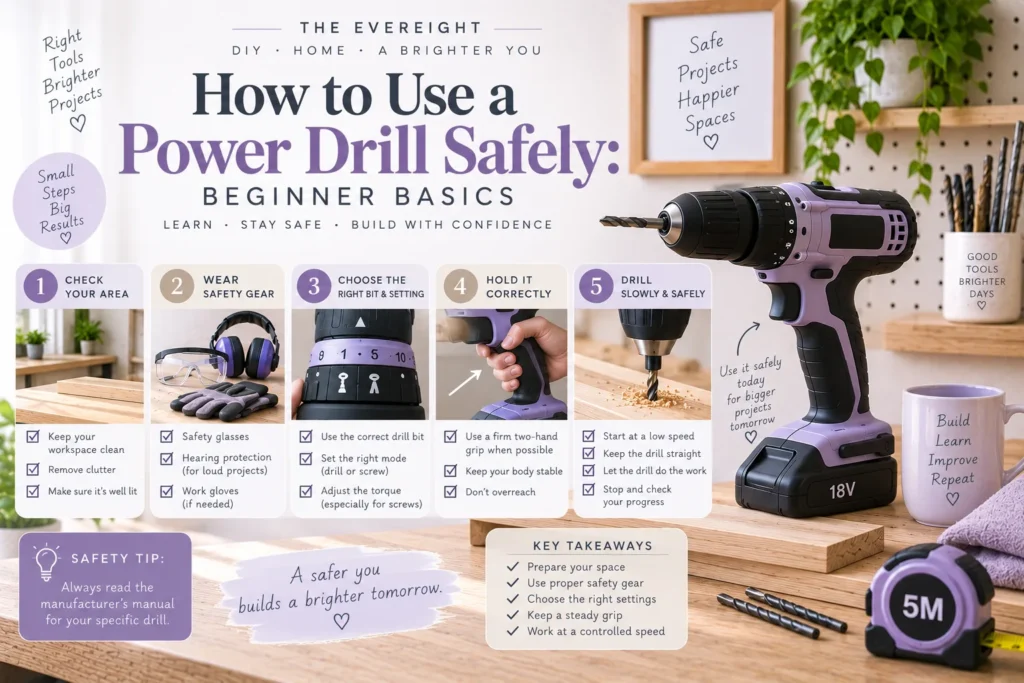
A power drill is one of the most useful beginner DIY tools, but its familiar shape can make it seem simpler than it is. A rotating bit can catch, bind, break, throw debris, damage a workpiece, or pull the tool unexpectedly if the setup is wrong.
Safe drilling begins before the trigger is pressed. You need the correct drill, accessory, material, speed, work support, and body position. The exact controls and procedures vary by model, so the manufacturer’s manual remains the primary instruction for your tool.
Quick Answer
Inspect the drill and bit, understand the controls, select an accessory designed for the material and tool, secure the workpiece, check for hidden hazards, wear appropriate protection, and start with controlled speed. Keep hands, loose clothing, hair, jewelry, and other objects away from the rotating accessory. Stop immediately if the bit binds, the tool behaves unexpectedly, or you are unsure what is behind the drilling location.
1. Read the Manual Before First Use
Find the instructions for:
- Trigger and variable-speed operation.
- Forward and reverse.
- Clutch settings.
- Mechanical speed ranges.
- Drill or hammer modes, if equipped.
- Chuck operation.
- Battery installation and removal.
- Approved accessories.
- Maintenance and storage.
Do not assume controls work the same way across brands.
2. Inspect the Drill
Before use, check the housing, chuck, controls, battery or cord, and accessory.
Do not use a tool with obvious damage, loose components, overheating signs, a damaged cord, or a battery that is swollen, cracked, leaking, or otherwise abnormal.
If the tool has been dropped or behaves differently, stop and assess it.
3. Choose the Correct Bit
Bits are designed for specific materials and tasks.
Wood, metal, masonry, tile, glass, and large-diameter hole-making can require different accessories and techniques.
The bit must also fit the drill’s chuck and remain within the tool’s rated capability.
Article #37 explains drill-bit selection in detail.
4. Inspect the Bit
A bent, cracked, excessively worn, or damaged bit can perform unpredictably.
Check cutting edges and shank condition.
Use impact-rated accessories with impact tools where required; do not assume every accessory that physically fits is appropriate.
5. Install the Bit Correctly
Disconnect power or remove the battery when the manufacturer instructs you to do so for accessory changes.
Open the chuck, insert the bit straight, and tighten it according to the tool instructions.
For a keyless chuck, grip and tighten as directed. For keyed equipment, remove the chuck key before operation.
Confirm the bit is centered and secure.
6. Understand the Clutch
On many drill/drivers, the numbered clutch settings limit driving force for screws.
Lower settings can reduce overdriving in delicate materials.
The numbers are not universal torque values.
For drilling holes, select the drilling mode specified by the manufacturer rather than leaving the tool on an arbitrary low clutch setting.
7. Choose the Correct Speed Range
Many drills have more than one mechanical speed range.
Lower speed is often used for higher-torque tasks or larger accessories; higher speed may suit smaller drilling tasks, depending on the material and bit.
Do not use a universal speed rule for every accessory.
Follow the drill and bit guidance.
8. Secure the Workpiece
Do not hold a small board in one hand while drilling it with the other.
Use clamps, a vise, or another suitable support.
Position clamps away from the bit path.
Support the material so it cannot spin if the bit catches.
A secure workpiece improves both safety and accuracy.
9. Check What Is Behind the Work
When drilling into a wall, floor, cabinet, or other installed surface, consider hidden electrical wiring, plumbing, gas lines, fasteners, and structural elements.
Detection tools can help but have limitations.
Do not drill blindly in a high-risk location.
If you cannot establish a safe drilling path, move the hole or seek qualified help.
10. Wear Appropriate PPE
Eye protection is a common requirement because drilling can create chips, dust, or broken fragments.
Hearing protection may be appropriate depending on tool, material, and duration.
Respiratory protection or dust controls may be needed for particular materials.
Follow product and workplace guidance.
Loose gloves can be hazardous around rotating machinery; follow the drill manufacturer’s recommendations.
11. Control Hair, Clothing and Jewelry
Tie back long hair.
Remove dangling jewelry.
Avoid loose sleeves, drawstrings, or clothing that can reach the rotating chuck or bit.
Keep the work area free of cords or materials that can become entangled.
12. Establish a Stable Body Position
Stand or sit so you can control the drill without overreaching.
Keep balanced footing.
Do not drill from an unstable chair, improvised platform, or awkward ladder position.
For overhead or elevated work, assess whether the task requires safer access equipment or professional help.
13. Start the Hole Slowly
Place the bit accurately.
Begin at a controlled speed to reduce wandering.
A pilot mark or pilot hole may help depending on the material and project.
Once the bit is established, adjust speed and pressure appropriately.
Do not immediately pull the trigger to maximum speed.
14. Keep the Drill Aligned
Hold the drill in the intended direction of the hole.
If the bit enters at an angle unintentionally, the hole can enlarge, the screw may sit crooked, or the bit can bind.
Check alignment from more than one direction when accuracy matters.
15. Use Appropriate Pressure
The drill should cut with the accessory doing the work.
Excessive pressure can overheat bits, reduce control, damage the material, or overload the tool.
Too little pressure can also create rubbing or poor cutting in some materials.
Use the technique recommended for the bit and material.
16. Expect Reaction Torque
If a bit binds, the drill body can rotate in the opposite direction.
Maintain a secure grip and body position.
Larger drills may have auxiliary handles; use them when the manufacturer requires or recommends them.
Do not lock yourself into a position where a sudden reaction can injure your wrist or throw you off balance.
17. Back the Bit Out Safely
When clearing chips from an appropriate hole, keep control and follow the technique suited to the material.
Do not pull a spinning bit toward your body.
Allow the bit to stop before touching it.
Bits can become hot during use.
18. Driving Screws With a Drill
Use the correct driver bit.
Start slowly.
Keep the bit aligned with the screw.
Use clutch settings where appropriate to reduce overdriving.
Stop before the screw damages the material.
For delicate hardware, final tightening by hand may provide better control.
19. Drilling Pilot Holes
Pilot holes can reduce splitting and make screw placement more accurate in many woodworking applications.
The correct pilot diameter depends on the screw and material.
Test on scrap when possible.
Do not assume one pilot-bit size works for every screw.
20. Drilling Metal
Use a bit designed for the metal and task.
Secure the workpiece.
Metal chips can be sharp and hot.
Speed, lubrication, and technique vary by metal and bit; follow the accessory guidance.
Never hold a small metal piece by hand while drilling.
21. Drilling Masonry
Masonry work requires appropriate bits and, in some cases, hammer-drill or rotary-hammer action.
Concrete and masonry can conceal reinforcement or services.
Dust may require specific controls.
If the project involves structural concrete, uncertain services, or difficult materials, get appropriate guidance.
22. Drilling Tile
Tile can crack, chip, or conceal plumbing and waterproofing systems.
The bit and technique depend on the tile material.
Bathroom and kitchen locations deserve extra caution because services may be behind the surface.
A beginner should not treat tile drilling as ordinary wood drilling.
23. What to Do If the Bit Binds
Release the trigger.
Maintain control until the tool stops.
Disconnect power or remove the battery as directed before investigating.
Do not grab the bit immediately; it may be hot.
Determine why it bound before restarting.
Possible causes include misalignment, excessive pressure, wrong speed, wrong accessory, unsupported material, or the bit breaking through.
24. Changing Bits
Wait for all movement to stop.
Follow the tool instructions for power disconnection and chuck operation.
Bits can be hot.
Do not use pliers on a hot bit unless the manufacturer provides a safe procedure; allow it to cool.
25. Battery Safety
Use only batteries and chargers approved as compatible by the manufacturer.
Keep contacts protected from short circuits.
Do not charge or store damaged batteries.
Follow temperature, charging, transport, and storage instructions.
Lithium-ion batteries require appropriate handling; physical damage, heat, or improper charging can create serious hazards.
26. Corded Drill Safety
Inspect the cord and plug.
Use appropriate power supply and extension equipment when required.
Keep the cord out of the drilling path and away from water.
Do not carry a tool by its cord.
Follow the manufacturer’s electrical safety instructions.
27. Clean Up After Drilling
Allow the tool and accessory to stop.
Remove power as appropriate.
Vacuum or collect dust and chips safely rather than brushing sharp material with bare hands.
Store bits so cutting edges do not damage other tools or hands.
Return the drill and battery to appropriate storage.
Common Beginner Mistakes
Using the wrong bit: The material is damaged and the tool is harder to control.
Holding the workpiece by hand: It can spin.
Drilling without checking behind a wall: Hidden services create serious risk.
Starting at maximum speed: The bit wanders.
Forcing the drill: Heat and binding increase.
Touching the bit immediately: It may be hot.
Using damaged batteries: Battery hazards are underestimated.
Treating the clutch as a universal torque scale: Settings vary.
A Five-Minute Practice Session
Before your first real project, clamp a scrap board securely.
Practice installing a bit, drilling a shallow pilot hole, reversing the tool, driving a screw with a conservative clutch setting, and removing the screw.
The purpose is not speed.
Learn how the trigger feels and how the tool reacts.
EverEight Pro Tip
Before every hole, say three things to yourself: “bit, back, support.” Confirm the bit matches the material, you know what is behind the drilling location, and the workpiece or surface is appropriately supported. It is a short checklist that catches three common setup mistakes.